
Download KeyCombiner – Free Keyboard Shortcut Learning Tool for Windows, Mac, Android & iOS
KeyCombiner is a free, secure, and highly effective keyboard shortcut learning tool designed for PC users who want to boost productivity by mastering essential keyboard commands. Whether you're a beginner or a power user, KeyCombiner helps you learn and memorize shortcuts across popular applications like Microsoft Office, Adobe Creative Suite, Visual Studio, and more. With an intuitive interface, interactive practice sessions, and real-time lookup functionality, this software turns learning shortcuts into a gamified, engaging experience.
Unlike traditional typing tutors such as TypingMaster or RapidTyping, KeyCombiner focuses specifically on keyboard shortcuts—making it a niche yet powerful tool for efficiency seekers. The app supports Windows, Mac, Android, and iOS, and is also available as a browser extension for Chrome and Firefox. With regular updates and a growing public database of shortcuts, KeyCombiner ensures you stay up to date with the latest command combinations.
Its dual-pane design, instant program detection, and customizable collections make it a standout choice for anyone serious about improving workflow speed and reducing mouse dependency.
Key Features of KeyCombiner
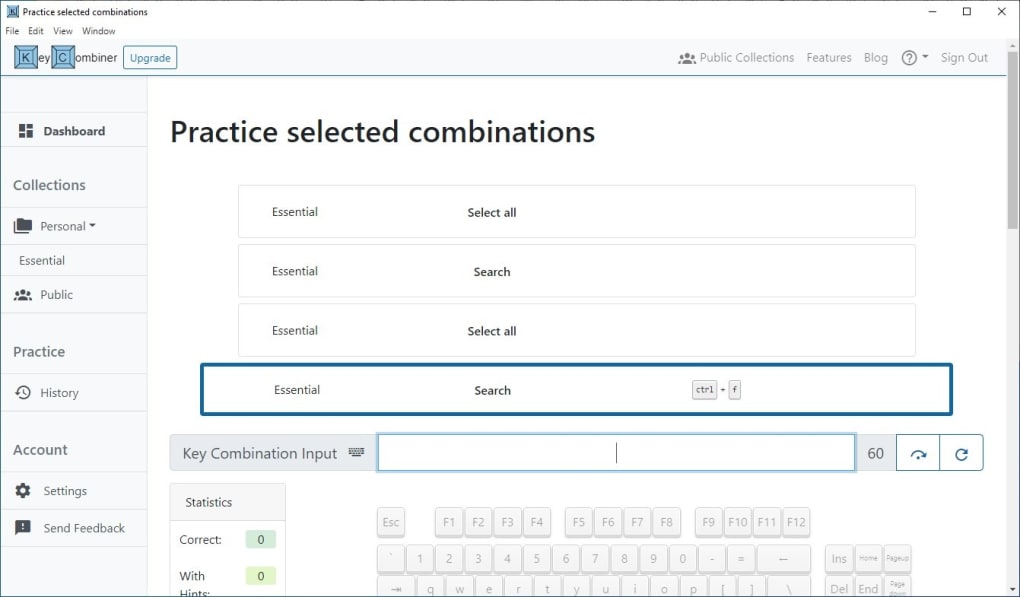
KeyCombiner stands out in the crowded productivity software space due to its unique focus on keyboard shortcut mastery. One of its most powerful features is the interactive practice mode, where users are presented with commands and must type the correct shortcut within a time limit—typically one minute. This real-time testing method reinforces memory retention through repetition and active recall, proven techniques in learning theory. The scoring system provides immediate feedback, helping users track their progress and identify weak areas.
Another standout feature is the instant lookup function, which automatically detects the active application (e.g., Photoshop, Word, or VS Code) and displays relevant shortcuts on the fly. This is incredibly useful during workflow, eliminating the need to switch tabs or search online. The tool also pulls from a publicly maintained database of shortcuts, which is continuously updated by the community. Users can explore this database to find and add individual shortcuts to their personal collections.
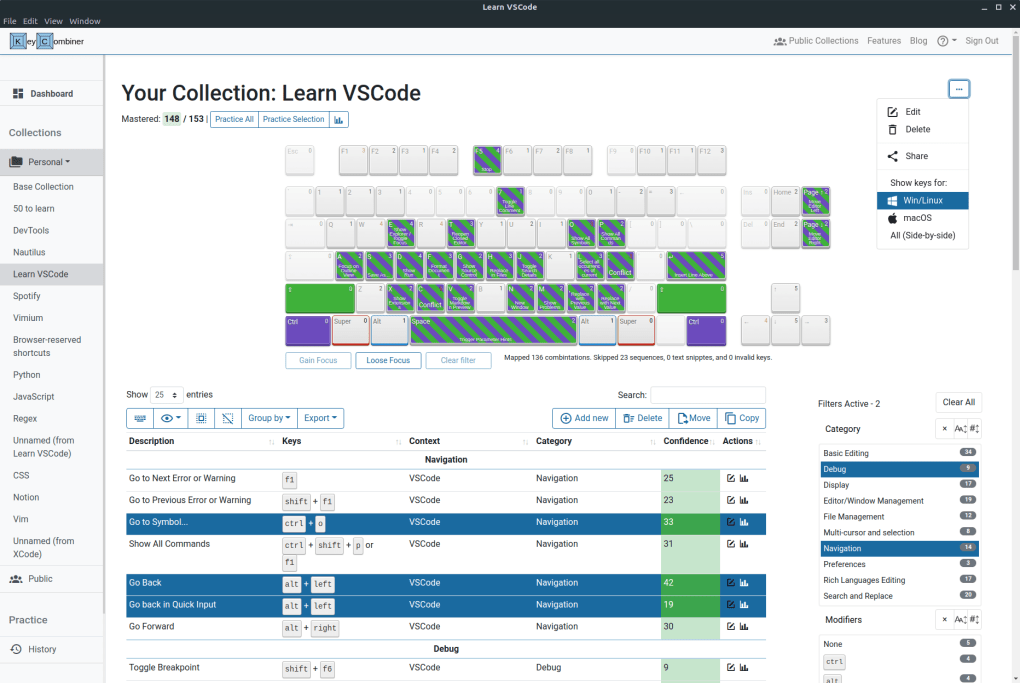
For those who want to customize their learning journey, KeyCombiner allows the creation of personal shortcut collections. While you can't import entire collections at once, you can manually select and save individual shortcuts for future practice. The dashboard is well-organized, featuring a sidebar for navigation and a main pane for active sessions, making it easy to switch between learning, reviewing, and managing collections. Additionally, the software is available as a browser extension and mobile app, ensuring seamless access across devices. With support for Windows, Mac, Android, and iOS, KeyCombiner truly delivers a cross-platform learning experience.
How to Install and Use KeyCombiner
Getting started with KeyCombiner is straightforward and requires just a few simple steps. First, visit the official website and download the software for your operating system—Windows, Mac, Android, or iOS. The installation process is quick and requires no advanced technical knowledge. Once installed, launch the app and create a free account. This step is essential, as your progress, collections, and preferences are synced across devices through your account.
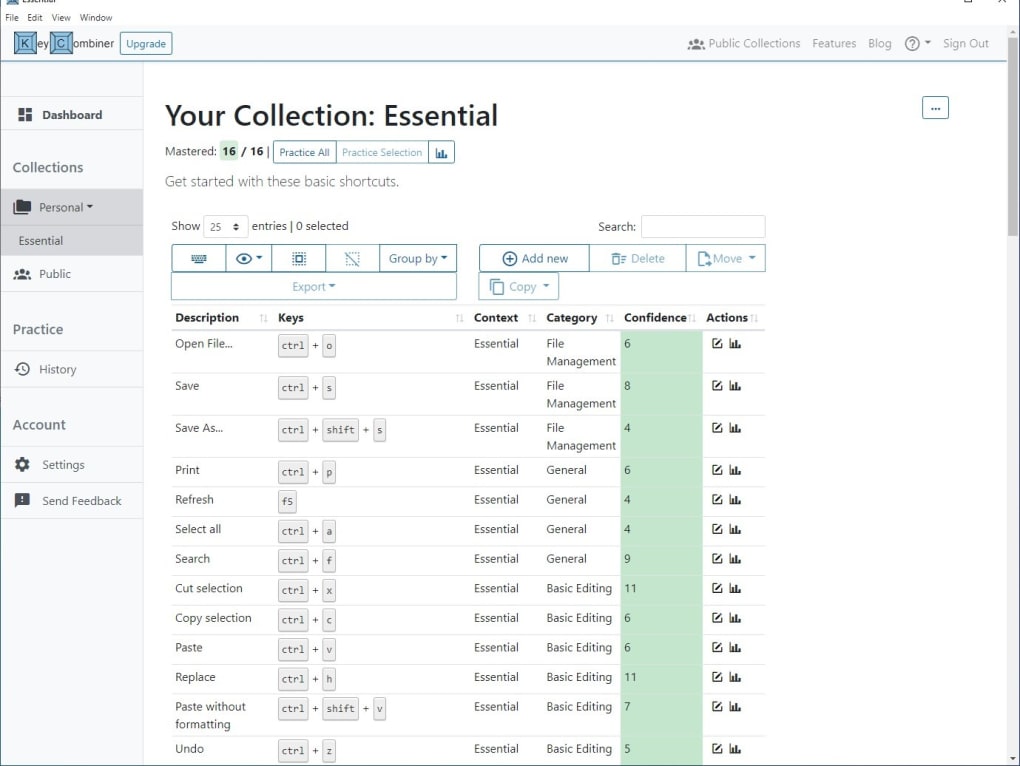
After logging in, you’ll land on the Dashboard, where you’ll find a default collection named “Essential” with commonly used shortcuts for Windows and popular software. To begin learning, click “Start Practice” and choose a collection. The app will display a command (e.g., “Copy Text”) and you’ll need to press the correct keyboard shortcut (Ctrl+C) within the time limit. Correct answers are highlighted in green, while incorrect ones appear in red, providing instant visual feedback.
For a more personalized experience, navigate to the “Collections” tab and explore the Public Collection. Here, you can browse shortcuts by application or category and add individual commands to your custom list. You can also create new collections from scratch. The instant lookup feature works in the background—just switch to any supported app, and KeyCombiner will detect it and show relevant shortcuts in a pop-up panel. This makes it ideal for on-the-go learning and real-world application.
Compatibility & System Requirements
KeyCombiner is designed with cross-platform accessibility in mind, making it one of the most versatile keyboard shortcut tools available. It supports Windows 7 and later, macOS 10.14 (Mojave) and above, Android 6.0 and higher, and iOS 12 and later. This ensures that whether you're using a desktop, laptop, tablet, or smartphone, you can continue your learning journey without interruption.
For users who prefer browser-based tools, KeyCombiner also offers Chrome and Firefox extensions. These are lightweight and integrate seamlessly into your browsing experience. When you’re working in a supported web app (like Google Docs or Trello), the extension will display relevant shortcuts directly in your browser window.
While KeyCombiner is fully functional on all supported platforms, it’s important to note that the app requires an active internet connection to function. This is because the shortcut database is hosted online and updated in real time. Offline use is not supported, so users should ensure stable connectivity for optimal performance. Additionally, the software does not allow bulk importing of collections—users must add shortcuts individually, which can be time-consuming for those building large libraries. However, this limitation is offset by the app’s clean design, intuitive interface, and regular updates that keep the database accurate and comprehensive.
Pros and Cons of KeyCombiner
- Pros:
- Free and secure with no hidden costs
- Interactive, gamified learning experience
- Instant lookup detects active apps and shows relevant shortcuts
- Supports Windows, Mac, Android, iOS, and browser extensions
- Large, community-driven database of shortcuts
- Regular updates and strong developer support
- Intuitive dual-pane interface for easy navigation
- Cons:
- Requires constant internet connection (no offline mode)
- Cannot import entire collections—must add shortcuts one by one
- Mobile app lacks some advanced features available on desktop
- Learning curve for users unfamiliar with shortcut-based workflows
- Limited customization for practice session settings
Frequently Asked Questions (FAQ)
- Is KeyCombiner free to download and use?
- Yes, KeyCombiner is completely free to download and use. There are no subscription fees or paywalls. The core features, including practice sessions, instant lookup, and access to the public database, are available at no cost.
- Can I use KeyCombiner offline?
- No, KeyCombiner requires an active internet connection to function. It relies on a cloud-based database for shortcut information and real-time updates, so offline usage is not supported.
- Which applications are supported by KeyCombiner?
- KeyCombiner supports a wide range of popular software, including Microsoft Office (Word, Excel, PowerPoint), Adobe Creative Suite (Photoshop, Illustrator), Visual Studio, Google Docs, Slack, and many others. The community continuously adds new shortcuts, so the list grows over time.
- How do I create my own shortcut collection?
- Go to the “Collections” section in the app, click “Create New Collection,” and give it a name. Then, browse the Public Collection and select individual shortcuts to add. You can save, edit, and practice with your custom list at any time.
- Is KeyCombiner available for mobile devices?
- Yes, KeyCombiner is available as a mobile app for both Android and iOS devices. It allows you to learn shortcuts on the go and sync your progress across all your devices.
Conclusion: Why You Should Download KeyCombiner Today
If you're serious about boosting your productivity and reducing reliance on the mouse, KeyCombiner is the ultimate keyboard shortcut learning tool. Its interactive practice sessions, instant lookup feature, and cross-platform availability make it a must-have for students, professionals, and power users alike. While it does require an internet connection and doesn’t support bulk collection imports, these trade-offs are minor compared to the benefits it delivers.
With a clean interface, regular updates, and a growing community-driven database, KeyCombiner offers a secure, free, and effective way to master shortcuts across your favorite apps. Whether you're working on a Windows PC, Mac, or mobile device, you can stay consistent in your learning journey. Don’t miss out—download KeyCombiner today and start mastering your keyboard in minutes.
Ready to supercharge your workflow? Click below to download KeyCombiner now—free, secure, and updated regularly for optimal performance.